
How to Make a Tesla Roadster Ramp and Kickflip AI Video
Make a Tesla Roadster ramp AI video: the car climbs a curved wall, flips on boosters and lands in smoke. Upload one side photo of any vehicle and generate.
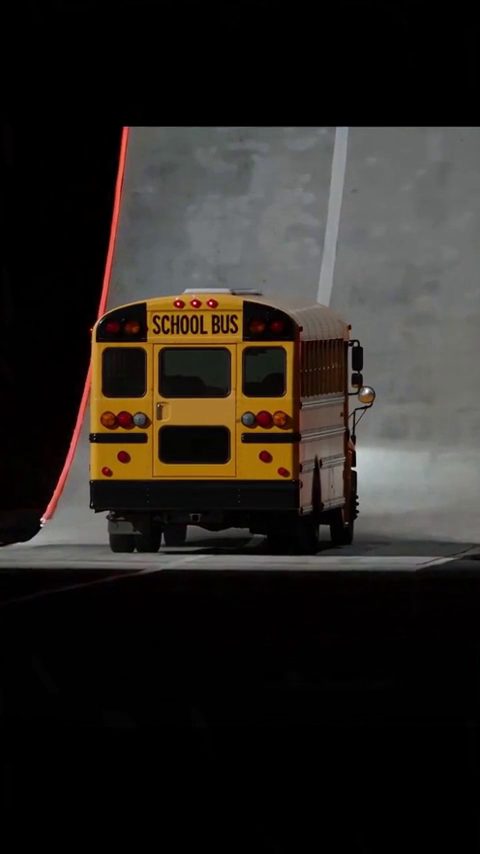
To make a Tesla Roadster ramp AI video, open the ramp scene in the studio, upload one clean side photo of your car and select Generate. The scene's prompt covers the whole stunt: up a curved wall, upside down at the top, rocket boosters, one flip and a landing in smoke.
The example below uses a yellow school bus, so any vehicle works. Roadster AI Video is an independent project and is not affiliated with Tesla or SpaceX.
What the Roadster ramp and kickflip video is
Tesla's October 15, 2026 Roadster livestream showed the car jumping and flipping on cold-gas thrusters, as reported by Electrek. This scene is a fictional, kickflip-style take on that kind of stunt.
It is set on a closed test track with a giant curved wall. The car accelerates up the wall until it is upside down at the top, rocket boosters fire, and it completes one clean flip before landing on all four wheels in a cloud of smoke. A wide side tracking shot follows the climb, then a slow-motion low angle catches the landing.
The example is vertical 9:16 and puts a school bus on the wall. Browse other stunt and launch scenes on the templates page.
Step 1: Open the ramp scene
Open the Roadster ramp scene in the studio. The link preselects the scene and loads its prompt. To watch the example and read the prompt first, visit the Tesla Roadster ramp template page.
You need an account with credits to generate.
Step 2: Upload a clean side photo of your car
The scene's photo tip: a clean side profile of the car on plain ground, and avoid busy backgrounds. The main shot is a wide side tracking shot, so a side profile shows the model the full length of the body and the wheels it needs to keep through the flip.
Do:
- Shoot the car straight from the side, with the whole body and both visible wheels in frame.
- Use plain ground and a simple background, such as an empty lot or a plain wall.
- Use daylight or even light.
Don't:
- Upload a photo with other cars, people or signs around the vehicle. A busy background can blend into the stunt.
- Crop the front or rear of the car.
- Use a dramatic low angle or a wide-angle close-up that distorts the body.
Step 3: Tweak the prompt (optional)
This is the scene prompt. You can generate with it as it is:
Use Image 1 as the visual reference for the car. Create a fictional stunt on a closed test track with a giant curved wall. The car accelerates up the wall until it is upside down at the top, rocket boosters fire, the car completes one clean flip and lands back on all four wheels in a cloud of smoke. Wide side tracking shot, then a slow-motion low angle on the landing. Keep the body shape, paint and wheels consistent through the flip. Clean footage only: no added titles, subtitles, logos or watermarks.
Change one thing at a time. Three edits that work well:
- Location. Change "a closed test track with a giant curved wall" to "an indoor concrete arena under floodlights with a giant curved wall".
- Time of day. Change "a closed test track" to "a closed test track at sunset" for warm, low light.
- Camera. Replace "Wide side tracking shot, then a slow-motion low angle on the landing." with "One wide, locked-off side shot that keeps the whole car in frame." Fewer cuts give the car fewer chances to change.
Don't raise "one clean flip" to two or three. Every extra rotation is another chance for the car to warp. Our list of Tesla Roadster AI video prompts includes another ramp flip prompt you can compare.
Step 4: Choose vertical or landscape and generate
The example is 9:16. A tall wall fits a tall frame, and it fills a phone screen on TikTok, Reels and Shorts. Pick 16:9 for YouTube or a website; it shows more of the run-up and the landing. Choose before you generate, because cropping later cuts off most of the frame.
Then choose the length and format offered in the studio, check the credit cost it shows and select Generate. You can close the page while it runs; the finished video appears in History.
Step 5: Download and post
Download the MP4 from History and label it as AI-generated when you post, using the platform's AI label if it has one. Because the stunt echoes a real reveal, a clear label keeps viewers from mistaking your clip for footage from the livestream. Our article Is the Tesla Roadster flying video real? explains how reveal footage differs from AI clips.
Tips to keep the car consistent through the flip
This is the hardest scene for consistency, because the car turns upside down. These habits help:
- One vehicle. Keep a single car in the photo and in the prompt.
- One action. The stunt is climb, flip, land. Don't add a second flip, a barrel roll or a spin on landing.
- One camera move per shot. Avoid a camera that orbits the car during the flip. A steady side view keeps the body readable.
- Avoid fast spins. If the car warps, ask for the flip itself in slow motion, for example "the car completes one slow, clean flip".
- Simplify before you regenerate. Results vary between generations. Cut the smoke or the second shot before you change the photo.
FAQ
Do I need to write a prompt?
No. The ramp scene comes with a ready-made prompt. Upload your photo and generate; editing is optional.
Can I use my own car?
Yes. Any car, truck, van or bus works; the example uses a school bus. A clean side profile keeps its shape and color recognizable through the flip.
How much does it cost?
One-time credit packs start at $4.99 for 40 credits, no subscription needed, and pack credits never expire. Monthly plans are also available. There are no free credits. The studio shows the cost before you generate, and if a generation fails, the credits return to your balance automatically. See pricing, or open the ramp scene and add your photo.